
Most Shopify merchants know SEO matters. Far fewer know which specific SEO issues are actually costing them rankings and traffic right now.
The most common SEO issues are not always the most damaging ones. Missing meta descriptions, for example, appear on nearly 73% of websites but barely affect rankings because Google generates one automatically. Meanwhile, a canonical tag pointing to a broken page, which affects a much smaller percentage of sites, can silently destroy a page’s ability to rank at all.
This guide focuses on the 10 SEO issues that genuinely matter for your Shopify store, why each one damages your rankings, and the practical solution SEO professionals use to fix each one.
Summary
- Section 1: Why fixing the right SEO issues matters more than fixing every issue
- Section 2: SEO issues 1 to 5: Indexability, broken pages, internal links, mobile, and HTTPS
- Section 3: SEO issues 6 to 10: Core Web Vitals, site structure, schema, duplicate content, and page size
- Section 4: How SearchPie helps Shopify merchants fix critical SEO issues automatically
Why You Need to Fix the Right SEO Issues First
Not every SEO issue deserves your immediate attention. Prioritizing the wrong ones wastes time that could go toward fixes that actually move the needle.
The framework for prioritizing SEO issues is straightforward: start with anything that prevents Google from indexing your pages correctly, then fix anything that directly hurts user experience and rankings signals, and finally address anything that limits how much of your content Google can read.
Use this priority framework as you work through the 10 SEO issues below. Start at the top and work down.
SEO Issues 1 to 5
SEO Issue 1: Indexability Problems
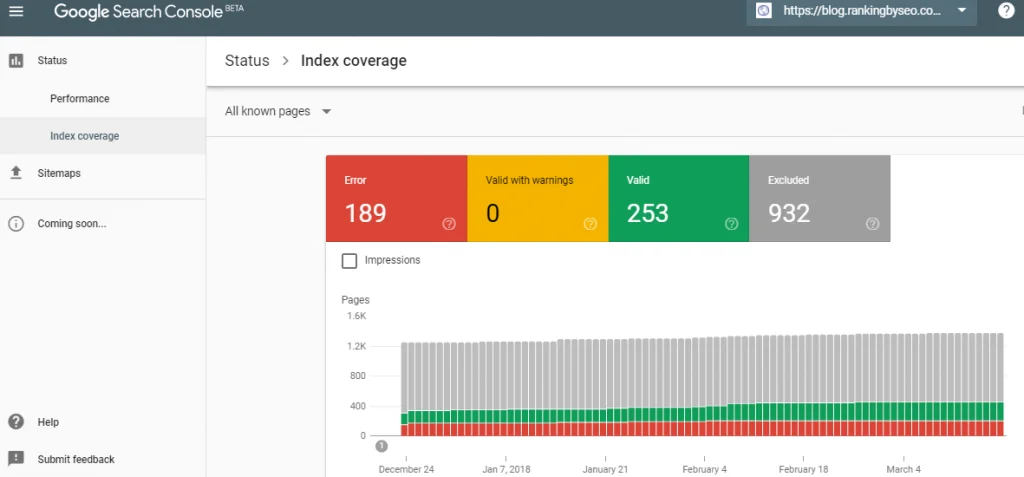
Indexability is a page’s ability to be found and listed in Google’s search results. If a page cannot be indexed, it simply will not appear in search, no matter how well-optimized the content is.
Three conditions must be met for any Shopify page to be properly indexed: it must be crawlable, it must not have a noindex tag, and it must be the canonical version of the content.
The most damaging indexability SEO issues include a canonical tag pointing to a 404 page (meaning Google receives contradictory instructions and often ignores the canonical entirely) and a canonical pointing to a redirect chain instead of the final destination URL.
Solution SEO fix:
- Open Google Search Console and go to the Pages report under Indexing.
- Look for pages listed under “Excluded” rather than “Indexed.” These are your indexability SEO issues.
- Check each excluded page for a noindex meta tag in the source code. Remove the tag from any page that should be ranking.
- Check canonical tags to confirm they point to a live, accessible URL returning an HTTP 200 status. Fix any canonical pointing to a 404 or redirect.
Time to fix: 1 to 3 hours depending on how many pages are affected.
SEO Issue 2: Broken Pages
Broken pages return 4XX errors (page not found) or 5XX errors (server errors). These pages will not be indexed by Google or will be dropped from the index, meaning any traffic they previously earned disappears. More importantly, if any external websites are linking to those broken pages, all that link equity is wasted.
For Shopify stores that regularly update their product catalog, broken pages are one of the most common and most overlooked technical SEO issues. Deleted products, changed collection URLs, and removed blog posts all create 404 errors if no redirect is set up.
Solution SEO fix:
- In Google Search Console, go to the Pages report and filter for “Not found (404).”
- For each broken page, decide whether to restore the page, redirect it to the closest relevant live page, or leave it as a 404 if there is no suitable redirect destination.
- For any broken page that previously had backlinks pointing to it, always set up a 301 redirect to a relevant live page rather than leaving it as a 404. This recovers the link equity.
- In Shopify admin, go to Online Store, then Navigation, then URL Redirects to add redirects without needing to edit code.
Priority: High. Broken pages with backlinks are one of the most costly SEO issues for Shopify stores that have been running for more than six months.
SEO Issue 3: Few or No Internal Links
Internal links are hyperlinks between pages on the same website. They serve two important SEO functions: they help Google discover and crawl pages across your site, and they pass link equity (sometimes called PageRank or link juice) from stronger pages to weaker ones.
Pages with no internal links pointing to them are called orphan pages. Google’s crawler can only find these through your sitemap or external backlinks. They receive no link equity from your other pages, which significantly limits their ability to rank.
For Shopify stores, product pages that are not linked from any collection page or blog post are common orphan pages.
Solution SEO fix:
- In Google Search Console, check the Coverage report for pages that are indexed but receiving no organic traffic despite being live. These are candidates for internal link improvement.
- For each orphan page, add at least one relevant internal link from a related collection page, blog post, or homepage section.
- When publishing new blog posts, always add two to four internal links to relevant product or collection pages. This is the most consistent internal linking habit that improves technical SEO over time.
- Review your main navigation to ensure your most important collection pages are reachable in one or two clicks from the homepage.
SEO Issue 4: Mobile Experience Problems
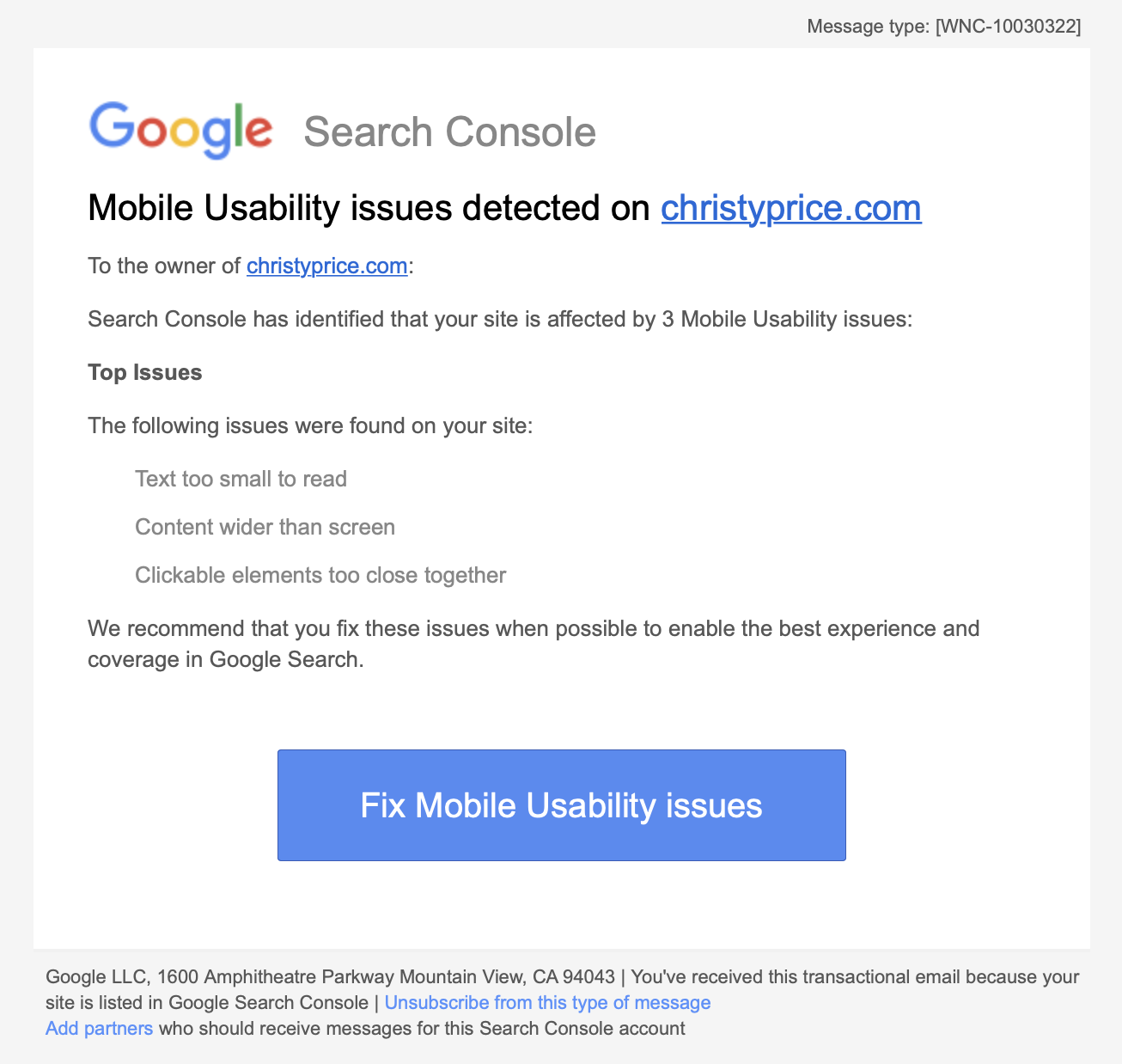
Google uses mobile-first indexing for all websites. This means the mobile version of your Shopify store is what Google primarily uses to evaluate, index, and rank your pages. Mobile experience SEO issues directly suppress rankings across your entire store, not just on mobile traffic.
Common mobile experience technical SEO issues include:
Solution SEO fix:
- In Google Search Console, go to Experience, then Mobile Usability. Review any flagged pages and address each specific issue listed.
- For viewport issues, check your Shopify theme settings. All themes in the official Shopify Theme Store include a correct viewport tag by default, but custom themes or heavily modified themes may have removed it.
- For tap target size issues, check your product pages and checkout flow on a real mobile device. Buttons should be at least 48 x 48 pixels for accurate tapping.
- Test any third-party apps or code snippets you have added to your theme. These are the most common source of mobile experience SEO issues in Shopify stores that started with a compliant theme.
SEO Issue 5: HTTPS Issues
Google uses HTTPS as a ranking signal. If your store is not fully served over HTTPS, or if some resources like images or scripts still load over HTTP, you may experience lower rankings and browser security warnings that reduce shopper trust.
Shopify includes a free SSL certificate for all stores automatically, which handles the main HTTPS requirement. However, mixed content SEO issues can still occur when resources embedded in your pages load over HTTP rather than HTTPS.
Solution SEO fix:
- In Google Search Console, check Security and Manual Actions for any HTTPS-related warnings.
- Check your store in a browser by looking at the address bar. A padlock icon confirms HTTPS is active. A “Not Secure” warning indicates an issue.
- If you find mixed content (some resources loading over HTTP), the quickest fix for Shopify stores is to update any hardcoded HTTP image or script URLs in your theme code to HTTPS.
- Confirm that all HTTP versions of your store URL automatically redirect to the HTTPS version. In Shopify, this is handled automatically through your domain settings.
SEO Issues 6 to 10
SEO Issue 6: Poor Core Web Vitals Scores
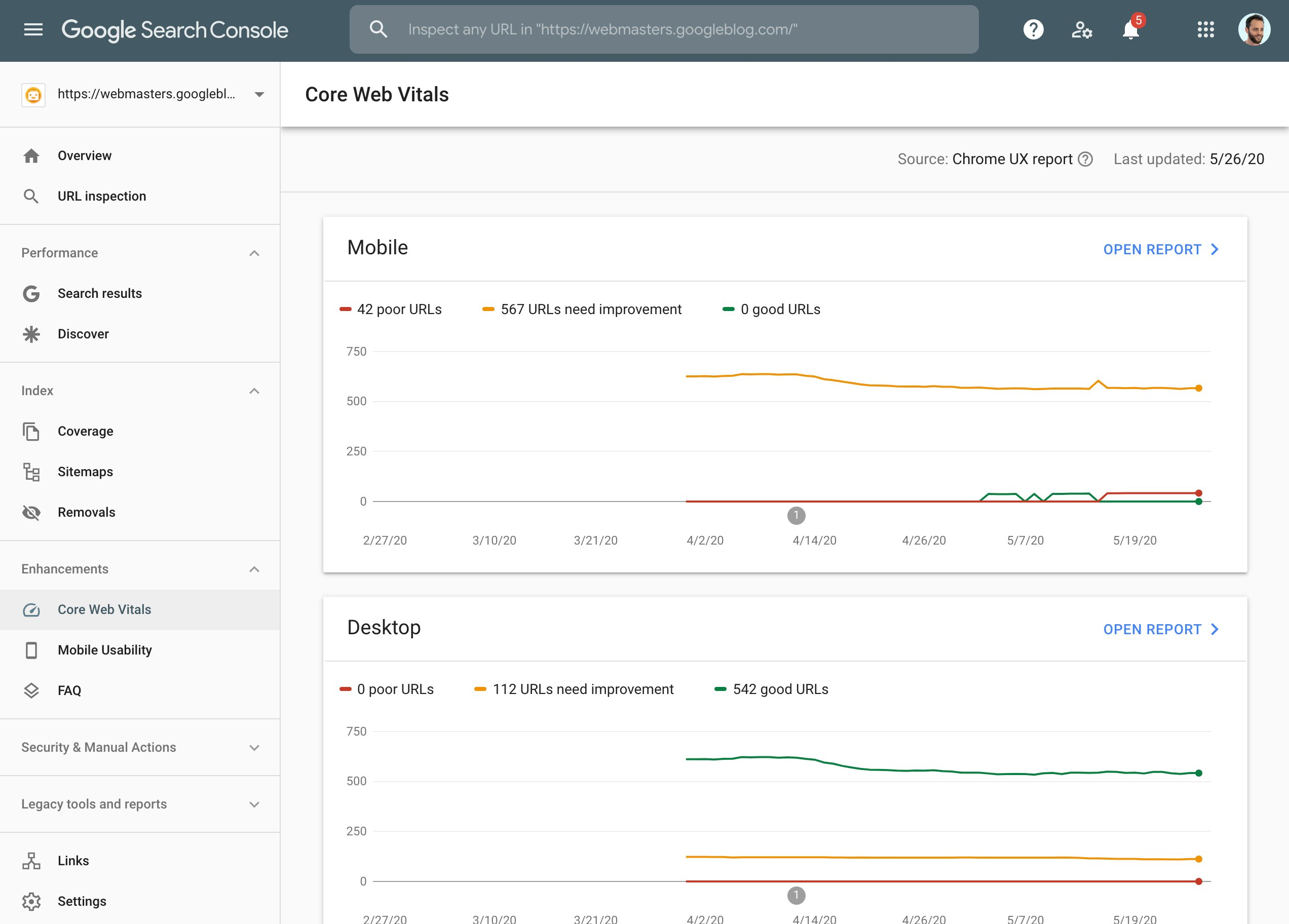
Core Web Vitals are Google’s page experience metrics. They measure how fast your pages load, how quickly they respond to user interactions, and how stable the layout is during loading. Poor scores are a direct ranking signal that can suppress your pages in competitive search results.
The three Core Web Vitals metrics are:
Solution SEO fix:
- In Google Search Console, go to Experience, then Core Web Vitals. Check the scores for both mobile and desktop.
- For LCP issues, the most common cause in Shopify stores is uncompressed product images. Compressing images and serving them in WebP format makes the biggest difference for most stores.
- For CLS issues, check whether any elements on your product pages or homepage shift position as the page loads. Common causes include images without specified dimensions and third-party app banners that load after the rest of the page.
- Fix Core Web Vitals at the theme level rather than page by page, since most issues come from shared template elements.
SEO Issue 7: Poor Website Structure (Pages Too Deep)
Website structure affects how efficiently Google crawls your store and how much link equity flows to your product pages. Pages that require more than six clicks to reach from the homepage receive significantly less link equity from your strongest pages.
For Shopify stores, this technical SEO issue commonly affects blog posts and product pages that are only accessible through multiple layers of categories or tags, or pages that exist but are not linked from any navigation element.
Solution SEO fix:
- Map your current site structure by listing your main navigation pages, then the pages they link to, then the pages those link to.
- Any important product or collection page that requires more than three clicks from the homepage should be given a more prominent internal link, either in the main navigation, a homepage section, or a high-traffic blog post.
- Review your Shopify navigation menus and add any high-priority collection pages that are currently missing.
SEO Issue 8: Missing or Incorrect Schema Markup
Schema markup is structured code that helps Google understand the context and content of your pages. It can make your listings eligible for rich results in Google search, such as star ratings, pricing, and availability shown directly in the search snippet.
Schema markup is not a ranking factor for standard text results, but it significantly increases click-through rates by making your listings visually stand out.
For Shopify stores, the most valuable schema types are Product schema (showing price, availability, and ratings), FAQ schema (showing questions and answers directly in search results), and Review schema (displaying star ratings in the snippet).
Solution SEO fix:
- Test your product pages using Google’s Rich Results Test at search.google.com/test/rich-results. If Price and Availability are not showing, your Product schema is incomplete or missing.
- Most Shopify themes include basic Product schema, but it often omits required fields. Verify that your schema includes at minimum: name, price, priceCurrency, availability, and image.
- For FAQ schema, add structured question-and-answer sections to your high-traffic product pages and blog posts, then mark them up with the appropriate JSON-LD schema code.
SEO Issue 9: Duplicate Content
Duplicate content occurs when the same or very similar content appears on more than one URL. When this happens, Google chooses which version to show in search results, and that choice may not be the page you want to rank.
For Shopify stores, duplicate content SEO issues commonly arise from:
Product pages accessible under both /products/product-name and /collections/collection-name/products/product-name.
Tag filter pages that create new URLs showing filtered versions of collection content.
The same store accessible under multiple domain variations (http, https, www, non-www).
Solution SEO fix:
- Check whether your store is accessible under multiple URL variations by typing each version into a browser. All variations should redirect to one canonical version, ideally the HTTPS non-www version.
- In Shopify, canonical tags for product pages are handled automatically. Confirm the canonical on your product pages points to the /products/ URL rather than the collection-based URL.
- For tag pages, add a noindex tag to prevent filtered collection URLs from being indexed as duplicate pages.
SEO Issue 10: Oversized HTML Pages
Google’s crawler only processes the first 2 MB of a page’s raw HTML. Any content beyond that limit is ignored entirely. This means links, schema markup, and page content near the bottom of oversized pages may never be read by Google.
This technical SEO issue is uncommon but severe when it occurs. Pages with heavy inline CSS or JavaScript, large embedded SVG files, or excessive base64-encoded images are the most common causes in Shopify stores.
Solution SEO fix:
- Check your most content-heavy pages using Google Search Console’s URL Inspection tool and review the crawled source.
- Move any inline CSS and JavaScript to external files rather than embedding them in the page HTML.
- Replace any base64-encoded images with standard external image files.
- For Shopify stores using heavily customized themes with large amounts of inline styling, consider working with a theme developer to move styles to an external stylesheet.
How SearchPie Fixes Critical SEO Issues for Shopify Merchants
Working through these 10 SEO issues manually is possible but time-consuming, especially for stores with large product catalogs where the same technical SEO problem may affect hundreds of pages simultaneously. SearchPie is built specifically for Shopify merchants who want these issues identified and fixed without needing a developer or managing multiple separate tools.
SearchPie’s SEO audit feature scans your entire store and surfaces the most damaging SEO issues across your product pages, collection pages, and blog posts. Instead of manually checking each page in Google Search Console, SearchPie identifies missing meta titles, duplicate content problems, schema gaps, and image optimization issues in a single dashboard view with prioritized recommendations for each fix.
For Core Web Vitals and page speed SEO issues, SearchPie’s speed optimization compresses product images automatically, reduces unnecessary code weight, and improves your LCP and CLS scores without requiring any theme editing. Faster pages mean better Core Web Vitals scores, which directly supports your rankings across competitive search terms.
For schema markup SEO issues, SearchPie’s Schema and Snippets feature automatically generates complete Product schema for every product page in your store, covering all required fields including price, availability, and review data. This makes your product listings eligible for rich results in Google search without requiring any JSON-LD coding.
For merchants who also want to stay ahead of AI search SEO issues, SearchPie’s Optimize for AI feature structures your product and collection content so AI-powered search tools can accurately read and surface your store in AI-generated shopping answers, a solution SEO requirement that most technical SEO tools do not yet address.
If you want to stop losing rankings to SEO issues that are hiding in plain sight on your Shopify store, SearchPie gives you the audit, the fixes, and the ongoing monitoring to stay on top of your technical SEO without spending hours in Search Console every week.
FAQS
The most important technical SEO issues include slow page speed, broken links, crawl errors, duplicate content, missing structured data, and poor mobile usability.
Start by running a site audit, fixing crawl errors, improving page speed, resolving broken links, optimizing metadata, and ensuring search engines can properly index your pages.
Prioritize high-impact fixes such as broken pages, indexing errors, Core Web Vitals, and structured data issues before moving on to lower-priority optimizations.
It’s a good practice to perform a technical SEO audit at least once a month and after major website updates, theme changes, or app installations.
Yes. Technical SEO issues can prevent search engines from crawling and indexing your store efficiently, leading to lower rankings, reduced organic traffic, and fewer sales.