
Every shopper who finds your store through Google typed something into the search bar first. That something is a keyword. If your Shopify store is not using the right Shopify keywords in the right places, those shoppers are finding your competitors instead of you.
Shopify keywords are the words and phrases your potential customers use when searching for products like yours. Getting them right is the foundation of any SEO Shopify strategy. It is also one of the few things you can do today that will keep bringing in free traffic for months and years without ongoing ad spend.
This guide covers everything you need to know about Shopify keywords: what they are, which types matter most for ecommerce, how to add keywords to your Shopify website correctly, and how to track whether they are working.
Summary
- Section 1: What Shopify keywords are and why they matter for your store
- Section 2: The 4 types of Shopify keywords and which ones to prioritize
- Section 3: How to find the right Shopify keywords for your products
- Section 4: How to add keywords to your Shopify website in 5 key places
- Section 5: How to track your keyword performance and improve over time
- Section 6: SearchPie – Powerful tools to automate your Shopify keywords workflow
What Are Shopify Keywords and Why Do They Matter
Shopify keywords are the words and phrases shoppers type into Google when they are looking for products. For example, a shopper might search “waterproof hiking boots women size 8.” Every word in that search is a potential keyword that could bring that shopper directly to your product page, but only if your store has been optimized for it.
SEO Shopify strategy starts with keywords because search engines use them to match your pages to relevant searches. When you include the right Shopify keywords in your page titles, product descriptions, meta descriptions, image alt text, and headings, Google understands what your pages are about and shows them to people searching for those terms.
The business case for getting this right is straightforward. The top five organic results on Google’s first page generate 70% of all clicks. Organic traffic from well-chosen Shopify keywords costs nothing per click and keeps arriving as long as your pages maintain their rankings. That is a fundamentally different model from paid ads, where traffic stops the moment your budget runs out.
Consistent use of relevant Shopify keywords across your store also builds topical authority over time. Google recognizes your domain as a trustworthy source in your niche, which gradually lifts rankings across your entire store, not just the pages you directly optimize.
The 4 Types of Shopify Keywords You Need to Know
Not all Shopify keywords work the same way. Understanding which type to use where is one of the most important parts of any SEO Shopify strategy.
Informational keywords are used by shoppers who want to learn something before buying. Phrases like “how to choose hiking boots” or “what is the difference between leather types” indicate research intent. These work best in blog posts and buying guides where you can answer questions and link to relevant products.
Commercial keywords are used by shoppers actively comparing options. Terms like “best waterproof hiking boots 2026” or “leather boot review” show the shopper is close to a decision. These Shopify keywords work well in comparison content and collection page descriptions.
Transactional keywords are used by shoppers who are ready to buy right now. Terms like “buy waterproof hiking boots” or “women’s hiking boots free shipping” show clear purchase intent. These are your most valuable Shopify keywords and belong on product pages and collection pages where shoppers can complete a purchase immediately.
Navigational keywords are brand-specific searches where shoppers look for a specific business by name. These become more important as your brand grows and customers start searching for you directly.
For most Shopify merchants, the highest-return keywords to prioritize first are transactional ones for your best-selling products, followed by commercial keywords for collection pages, and informational keywords for blog content.
How to Find the Right Shopify Keywords for Your Store
Finding the right Shopify keywords is not guesswork. It is a systematic process of understanding what your customers are actually searching for and matching those searches to the pages on your store.
Start with your products. List every product category and individual product. For each one, write down the words a shopper would use to find it. Think like a customer, not like a store owner. A customer does not search “premium artisan leather footwear.” They search “brown leather boots men size 11.”
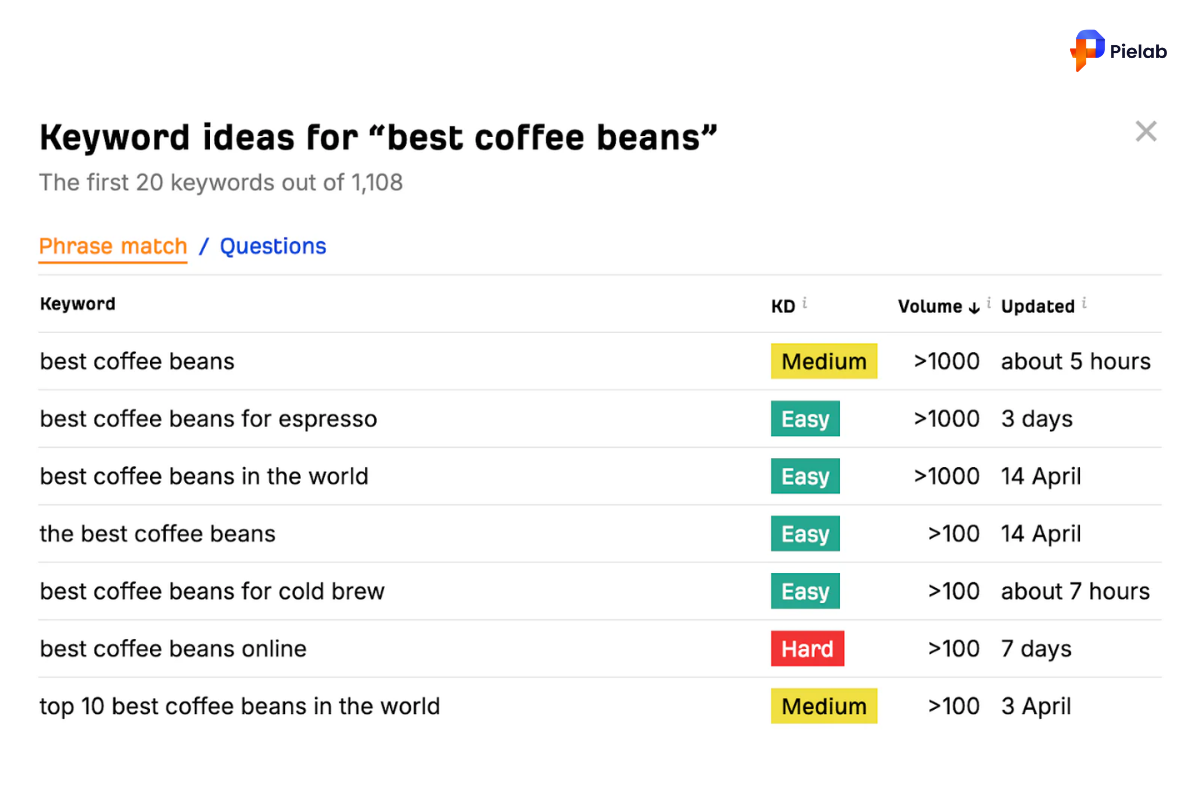
Use keyword research tools. Tools like Google Keyword Planner, Ubersuggest, and Semrush show you monthly search volume and competition levels for any term. Type in your seed keywords and look for related variations. Focus on Shopify keywords with monthly search volume between 100 and 5,000 and manageable competition. These are the terms where smaller stores can realistically rank.
Understand long-tail keywords. Long-tail keywords are phrases of three or more words, like “all-season waterproof hiking boots for women.” They have lower search volume than broad terms but much stronger purchase intent. A shopper who types a specific phrase is far more likely to buy than one who types a single word. Long-tail Shopify keywords are where most merchants win their first organic rankings.
Check what is already working. Open Google Search Console and look at which queries are already bringing visitors to your store. Pages that appear for a Shopify keyword but rank on page two are the fastest SEO Shopify wins available. A small improvement to those pages can move them to page one and dramatically increase clicks.
Group keywords into clusters. Related Shopify keywords should be grouped together and assigned to the same page. For example, “hiking boots,” “waterproof hiking boots,” and “women’s hiking boots” could all be targeted on one collection page. One strong page targeting a cluster of related terms outperforms three weak pages each targeting a single keyword.
How to Add Keywords to Your Shopify Website
Knowing the right Shopify keywords is half the work. Placing them correctly on your store is the other half. There are five key places where keywords must appear for effective SEO Shopify results.
Place 1: Page Titles
The page title is the single most important place to add Shopify keywords. It is the clickable link that appears in Google search results and the strongest signal Google uses to understand what a page is about.
Steps:
- From your Shopify admin, go to the product, collection, or page you want to optimize.
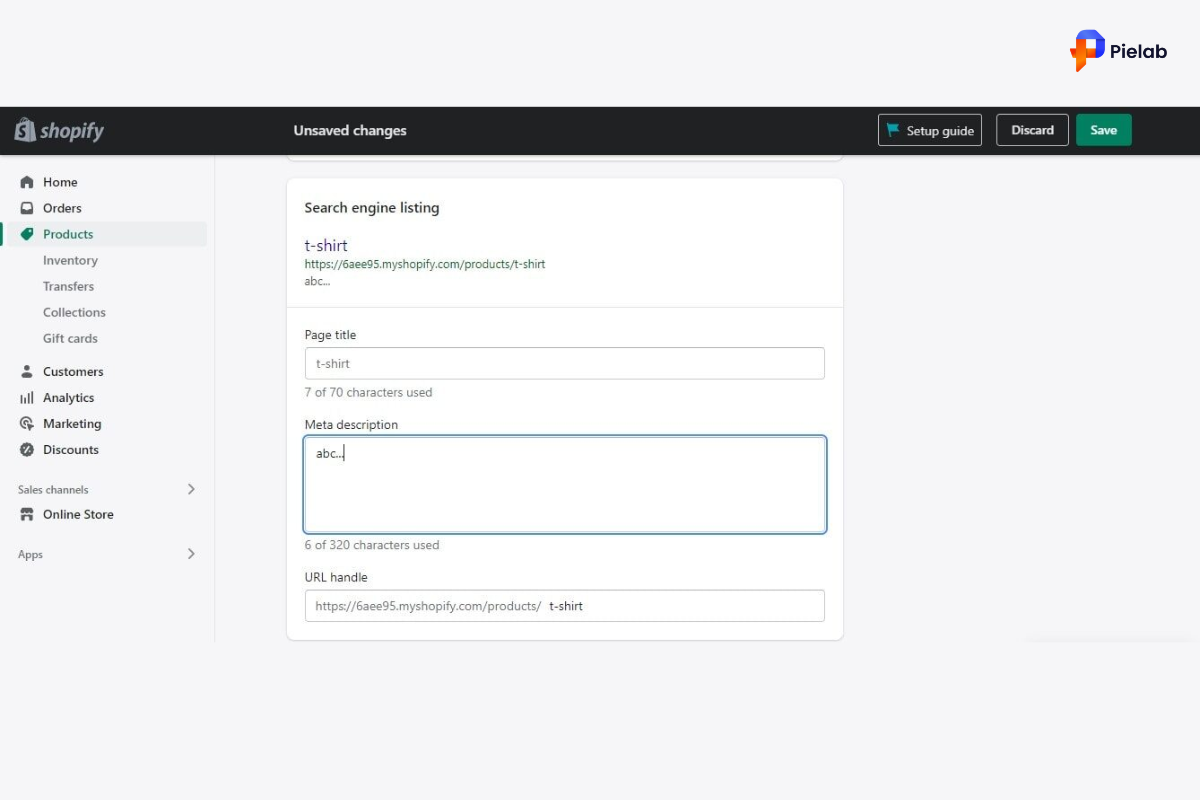
- Scroll to the “Search engine listing preview” section and click Edit website SEO.
- In the Page title field, enter a title that places your primary Shopify keyword near the beginning.
- Keep the title under 60 characters to avoid it being cut off in search results.
- Make the title descriptive and specific. “Star Wars Button Down Shirts” performs better than just “Star Wars Shirts” because it includes a secondary keyword automatically.
Good title examples for SEO Shopify optimization:
- “Women’s Waterproof Hiking Boots | Free Shipping” (55 characters, keyword near front)
- “Organic Cotton Baby Blankets | Soft and Washable” (49 characters, keyword leads)
Place 2: Meta Descriptions
The meta description appears below your title in search results. It does not directly affect rankings but directly affects whether shoppers click your result over a competitor’s. Including your Shopify keywords here improves click-through rate.
Steps:
- In the same Search engine listing preview section, click the Description field.
- Write a 150 to 160 character description that includes your primary keyword and a clear reason to click.
- Use natural, readable language. A sentence like “Shop women’s waterproof hiking boots with free shipping on orders over $60” works far better than a list of keywords.
Place 3: Image Alt Text
Search engines cannot see your product images. They read the alt text attached to each image to understand what is shown. Adding relevant keywords to image alt text helps your store appear in Google image search and provides additional SEO Shopify signals.
Steps:
- From your Shopify admin, go to Products and click the product you want to edit.
- Click the product image, then click Edit alt text.
- Write a descriptive phrase that includes your keyword naturally. For example: “Women’s brown waterproof hiking boots side view” rather than just “boots.”
- Keep alt text under 100 characters and describe what is actually in the image. Do not force multiple keywords into a single alt text field.
- Click Save alt text.
Place 4: H1 Headings
The H1 heading is the main title that appears at the top of each page. In Shopify, the product or collection title you enter automatically becomes the H1. This means your titles must include your primary Shopify keywords.
Steps:
- Go to the product, collection, or blog post you want to optimize.
- In the Title field, enter a descriptive name that naturally includes your target keyword.
- Keep collection titles clear and keyword-rich. “Women’s Waterproof Hiking Boots” outperforms “Our Hiking Collection” because Google reads it as a direct match to what shoppers are searching for.
Place 5: Page Body Content
Every product description, collection description, and blog post on your store should include your target Shopify keywords naturally throughout the text. Search engines compare headings against body content to confirm a page is genuinely about what it claims to be about.
Steps:
- Write product descriptions of at least 250 words and blog posts of at least 500 words. Longer content gives Google more context for understanding which keywords your page deserves to rank for.
- Include your primary Shopify keyword in the first paragraph of every page.
- Use secondary keywords and related terms naturally throughout. Google understands synonyms and related phrases, so you do not need to repeat the exact keyword phrase constantly.
- Never copy manufacturer descriptions. Duplicate content does not rank. Write original descriptions for every product.
- Avoid keyword stuffing. Forcing terms into unnatural sentences hurts both rankings and shopper trust.
How to Track Your Shopify Keywords Performance
Adding Shopify keywords to your store is the start, not the finish. Tracking how those keywords perform tells you what is working and where to focus next.
Timeline: Changes to page titles and meta descriptions take two to four weeks to show in Google results after recrawling. If you want Google to recrawl a page faster after making changes, use the URL Inspection tool in Search Console and request indexing for that specific URL. Ranking improvements from keyword-optimized content take six to ten weeks to show clearly in performance data.
The most important habit in SEO Shopify strategy is reviewing Search Console monthly. Sort by impressions and look for pages that are visible in Google but not getting clicks. These are your fastest improvement opportunities and the pages where better Shopify keywords placement can deliver results quickly.
Tools That Automate Your Shopify Keywords Workflow
Finding and managing Shopify keywords manually works for small stores. For growing catalogs, the right tools make the difference between a keyword strategy that scales and one that stalls as your product range expands.
SearchPie: Keyword Explorer and Keyword Audit Built for Shopify Merchants
SearchPie is built specifically for Shopify merchants who want to find, track, and optimize keywords without needing SEO expertise or juggling multiple separate tools.
Keyword Explorer. SearchPie’s Keyword Explorer lets you research Shopify keywords directly from your Shopify dashboard without switching to external platforms. Enter a seed keyword related to your products and Keyword Explorer surfaces related terms with search volume, competition data, and keyword difficulty scores. This makes it straightforward to identify the long-tail Shopify keywords where your store can realistically rank and build your content strategy around real data. Instead of guessing which terms to target, you see the numbers clearly and can prioritize the keywords most likely to drive qualified traffic to your store.
Keyword Audit. SearchPie’s Keyword Audit feature scans your existing product pages, collection pages, and blog posts to identify where keywords are missing, incorrectly placed, or underperforming. It flags pages with no primary keyword in the title tag, missing meta descriptions, images without alt text, and thin content that needs more depth. This gives you a prioritized action list of the fixes that will have the biggest impact on your SEO Shopify results, without having to audit every page manually inside Shopify admin.
Together, Keyword Explorer and Keyword Audit create a complete Shopify keywords workflow. You use Keyword Explorer to find the right terms, then Keyword Audit to make sure those terms are correctly placed across your store and kept up to date as your catalog grows.
Combined with SearchPie’s meta tag management, image optimization, schema markup, and blog SEO checklist, your keyword strategy sits alongside all your other SEO fixes in one dashboard rather than being spread across multiple tools.
Best for: Shopify merchants who want a structured, data-driven approach to finding and implementing Shopify keywords without the learning curve of professional SEO platforms.
FAQS
You can add keywords to your Shopify website through product titles, descriptions, collection pages, blog content, image alt text, and meta tags.
Start by researching search terms your customers use, then naturally place those keywords across your Shopify product pages, collections, and blog posts.
SEO keywords should appear in page titles, meta descriptions, URLs, headings, product descriptions, image alt text, and internal links.
In Shopify Admin, edit your products, collections, and pages to include relevant SEO keywords in the content and search engine listing preview section.
Shopify does not use a dedicated meta keywords field because Google ignores meta keywords, so focus instead on title tags and meta descriptions.