
Starting a Shopify business feels overwhelming at first. There are plans to choose, themes to install, payments to configure, and products to upload, all before a single sale happens. But thousands of merchants with zero ecommerce experience have built profitable stores on Shopify, and the platform is designed to make the technical side manageable.
This guide walks you through every step of launching a Shopify business from scratch. From choosing the right plan to promoting your store and analyzing what is working, you will have a clear picture of exactly what is involved and what to focus on first.
Summary
- Section 1: Choosing the right Shopify plan for your business stage
- Section 2: Setting up your Shopify store from scratch
- Section 3: Adding products and organizing collections
- Section 4: Configuring payments and launching your store
- Section 5: How to promote your Shopify business and get sales
- Section 6: SearchPie features that help your Shopify business grow faster
Choosing the Right Shopify Plan for Your Business
The first decision every Shopify beginner faces is which plan to start with. Shopify offers three standard plans, each suited to a different stage of business growth.
All three plans include unlimited products, unlimited hosting, and access to analytics. The main difference between plans is the transaction fee for third-party payment gateways and access to more advanced reporting features.
For most Shopify beginners, the Basic plan is the right starting point. As your Shopify business grows and your monthly revenue increases, moving to a higher plan makes financial sense because the lower transaction fees offset the higher monthly cost.
Shopify offers a free 3-day trial followed by $1 per month for the first three months on any standard plan, which gives new merchants enough time to set up and test their Shopify business before committing to the full monthly fee.
Setting Up Your Shopify Store From Scratch
Once your account is created, you need to configure the essential settings before your Shopify business can operate properly.
General Store Settings
Go to Settings, then General, and fill in your store name, address, contact email, and currency. These details appear on invoices and order confirmations, so accuracy matters from the start.
Checkout and Shipping Settings
Go to Settings, then Checkout, to configure how customers receive order and shipping notifications and what information is required from them at checkout. Then go to Settings, then Shipping and Delivery, to add shipping zones and rates.
Shipping transparency is one of the most important conversion factors for any Shopify business. Research from the Baymard Institute consistently shows that unexpected shipping costs are the number one reason for cart abandonment, cited by 39% of shoppers. Be clear about shipping costs upfront rather than revealing them at the final checkout step.
Tax Settings
Go to Settings, then Taxes and Duties, to configure how taxes are collected. For most Shopify beginners, using Shopify’s automated tax services saves significant time and reduces the risk of misconfigured tax settings affecting your Shopify business.
Domain Setup
Your Shopify business starts with a free .myshopify.com subdomain. This is fine during setup, but before launch you should purchase a custom domain. A custom domain looks more professional, builds trust with shoppers, and is better for SEO.
You can buy a domain directly through Shopify at Settings, then Domains, then Buy New Domain. Buying through Shopify is the simplest option for beginners because it connects automatically without any DNS configuration. Always check the renewal price before purchasing, as first-year prices are often lower than subsequent years.
Legal Pages
Your Shopify business needs several legal pages before launch. Go to Settings, then Policies, to find Shopify templates for your refund policy, privacy policy, and terms of service. Customize these templates for your specific business before publishing. Also create an About Us page, a Contact page, and an FAQ page to reduce purchase hesitation.
Adding Products and Organizing Your Shopify Store
With your settings configured, you can start building the product catalog at the center of your Shopify business.
How to Add Products
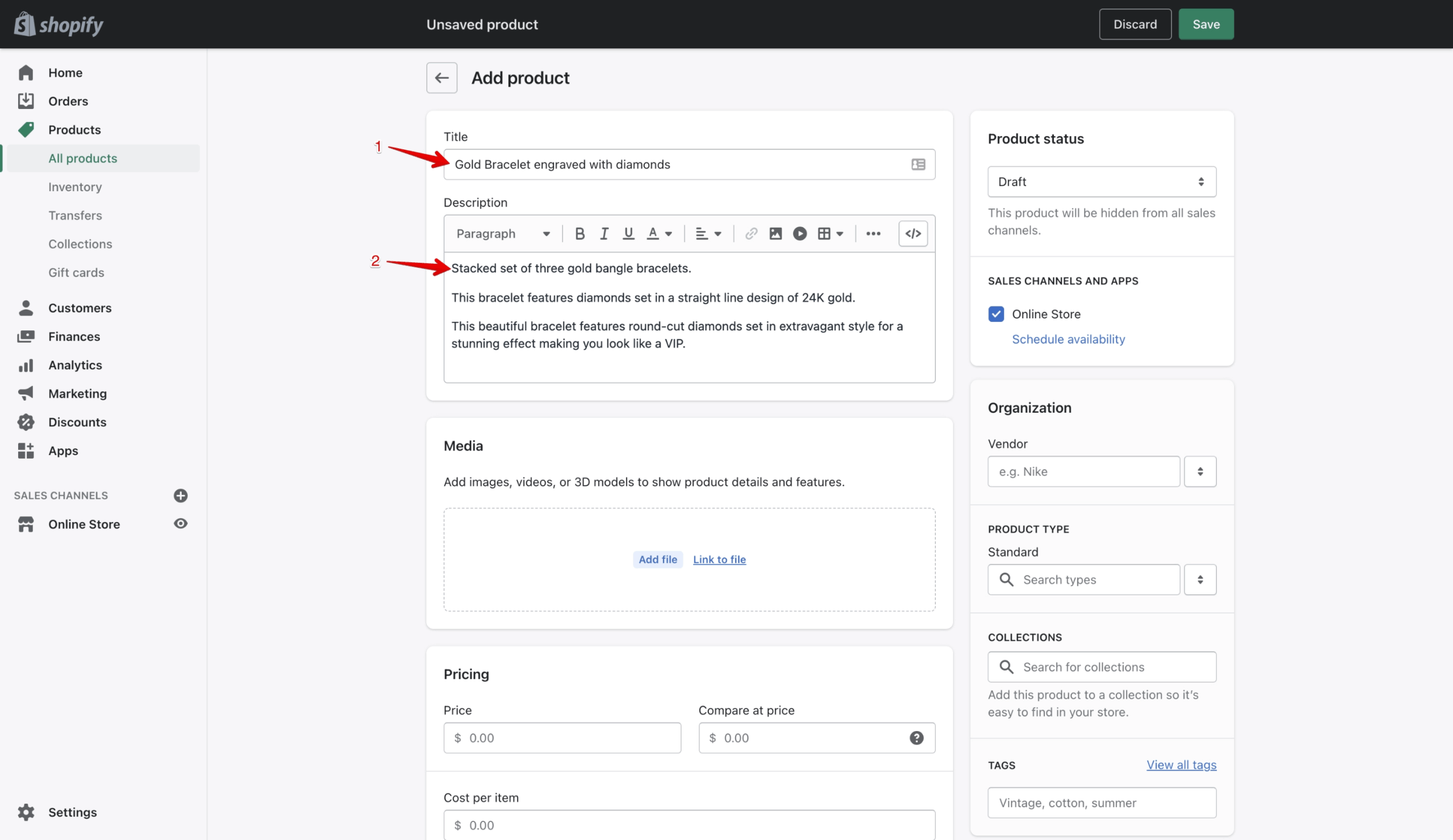
- From your Shopify admin, go to Products.
- Click Add Product.
- Add the product title, description, images, pricing, and inventory details.
- Set the Status to Active if you want the product visible immediately.
- Click Save.
For Shopify businesses with large catalogs, bulk importing is faster. Go to Products, then Import, and download the CSV template. Fill in your product data and upload the file to add hundreds of products at once.
Writing Product Descriptions That Convert
For any Shopify business, product descriptions that lead with benefits outperform those that lead with features. A shopper does not want to know that a jacket has a “400 thread count inner lining.” They want to know it will keep them warm in wet conditions. Write descriptions that answer the question “how will this improve my life?” before listing technical specifications.
Using High-Quality Product Images
Use white background images to show the product clearly and lifestyle images to help shoppers visualize using or wearing it. For Shopify businesses selling apparel or home goods, lifestyle images directly support conversion because they help shoppers picture the product in their own context.
Shopify recommends a minimum image size of 2048 x 2048 pixels for product images. This ensures zoom functionality works correctly and images look sharp on high-resolution mobile screens.
Organizing Products Into Collections
Collections organize your products into browsable categories and are essential for any Shopify business with more than a handful of products. They also target additional keywords in search results, supporting your organic traffic over time.
Go to Products, then Collections, then Add Collection to create a new one. Shopify offers two types:
Manual collections require you to add products individually. Use these for small, curated groups of products.
Smart collections automatically include products that match the rules you set, such as any product tagged with a specific label. Smart collections are the better choice for Shopify businesses with large catalogs because they update themselves as new products are added.
Adding Customer Reviews
Customer reviews are one of the highest-impact trust signals for any Shopify business. Research shows that 89% of consumers read reviews before buying. Shopify does not include a native review feature, but free apps like Judge.me offer unlimited reviews on a free plan.
Configuring Payments and Launching Your Shopify Business
Shopify Payments
Shopify Payments is the built-in payment solution and the recommended choice for most Shopify beginners. It automatically sets up all major payment methods including Visa, Mastercard, American Express, Apple Pay, Google Pay, and Shop Pay. It also eliminates third-party transaction fees, which can save up to 2% per order depending on your plan.
To set up Shopify Payments, go to Settings, then Payments, then Activate Shopify Payments, and follow the setup steps.
Third-Party Payment Gateways
If your country is not supported by Shopify Payments, you will need a third-party payment gateway. These come with additional transaction fees:
For most Shopify businesses, these fees add up quickly and reduce profit margins meaningfully. Use Shopify Payments wherever available.
Launching Your Shopify Business
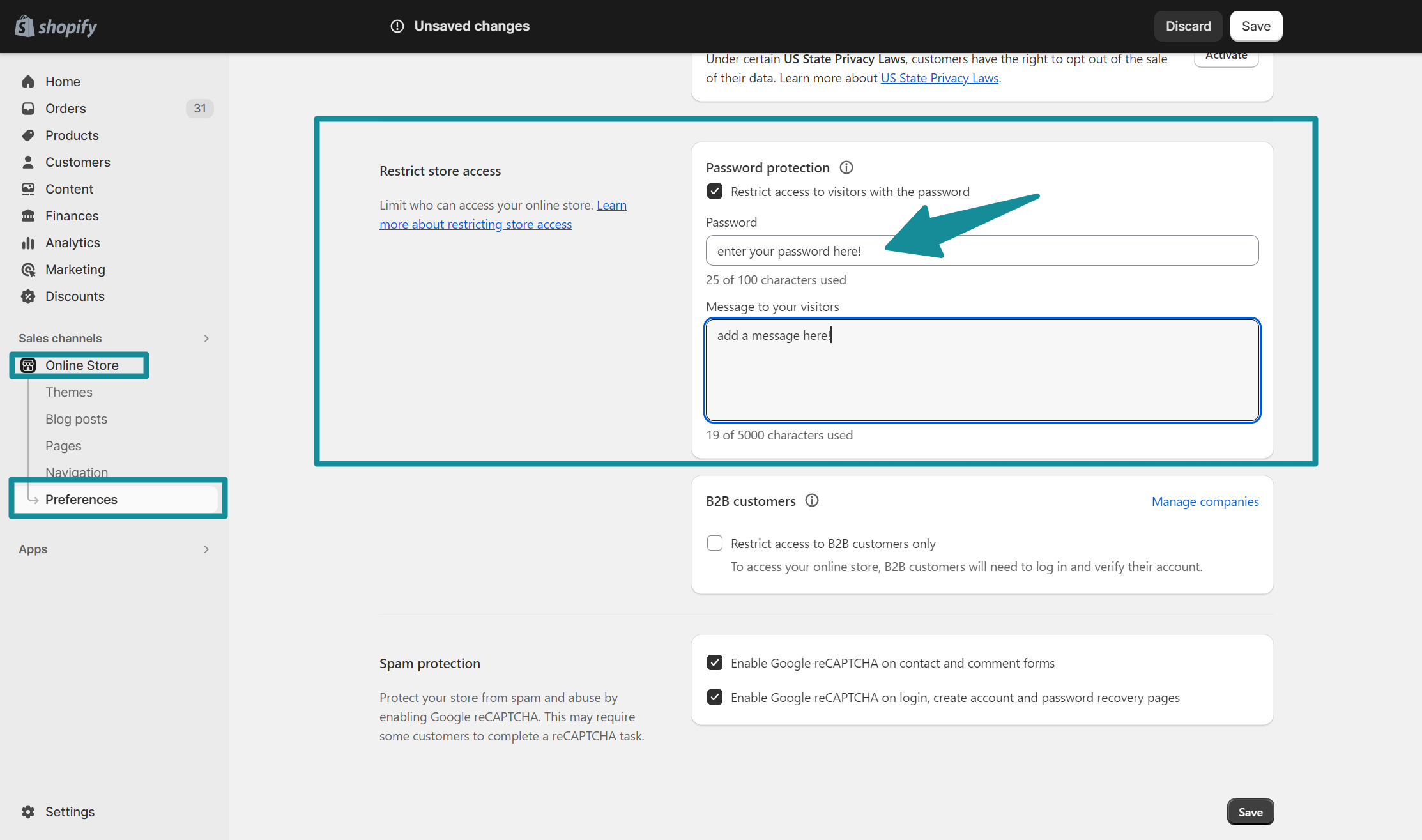
When your store is ready, remove the password protection to make it live. Go to Online Store, then Preferences, and toggle off the Password Protection setting. Your Shopify business is now live and accessible to anyone with the URL.
How to Promote Your Shopify Business and Get Sales
Launching your Shopify business is straightforward. Getting consistent sales requires ongoing marketing effort. Here are the most effective promotion strategies for Shopify beginners.
SEO Optimization
Search engine optimization is the most sustainable long-term marketing channel for any Shopify business. It takes time to produce results, but once your store ranks for relevant keywords, the organic traffic it generates costs nothing per click and compounds over time.
Key SEO tasks for your Shopify business include optimizing product and collection page titles and meta descriptions, writing keyword-rich product descriptions, ensuring your store loads fast on mobile, and building blog content that attracts informational search traffic.
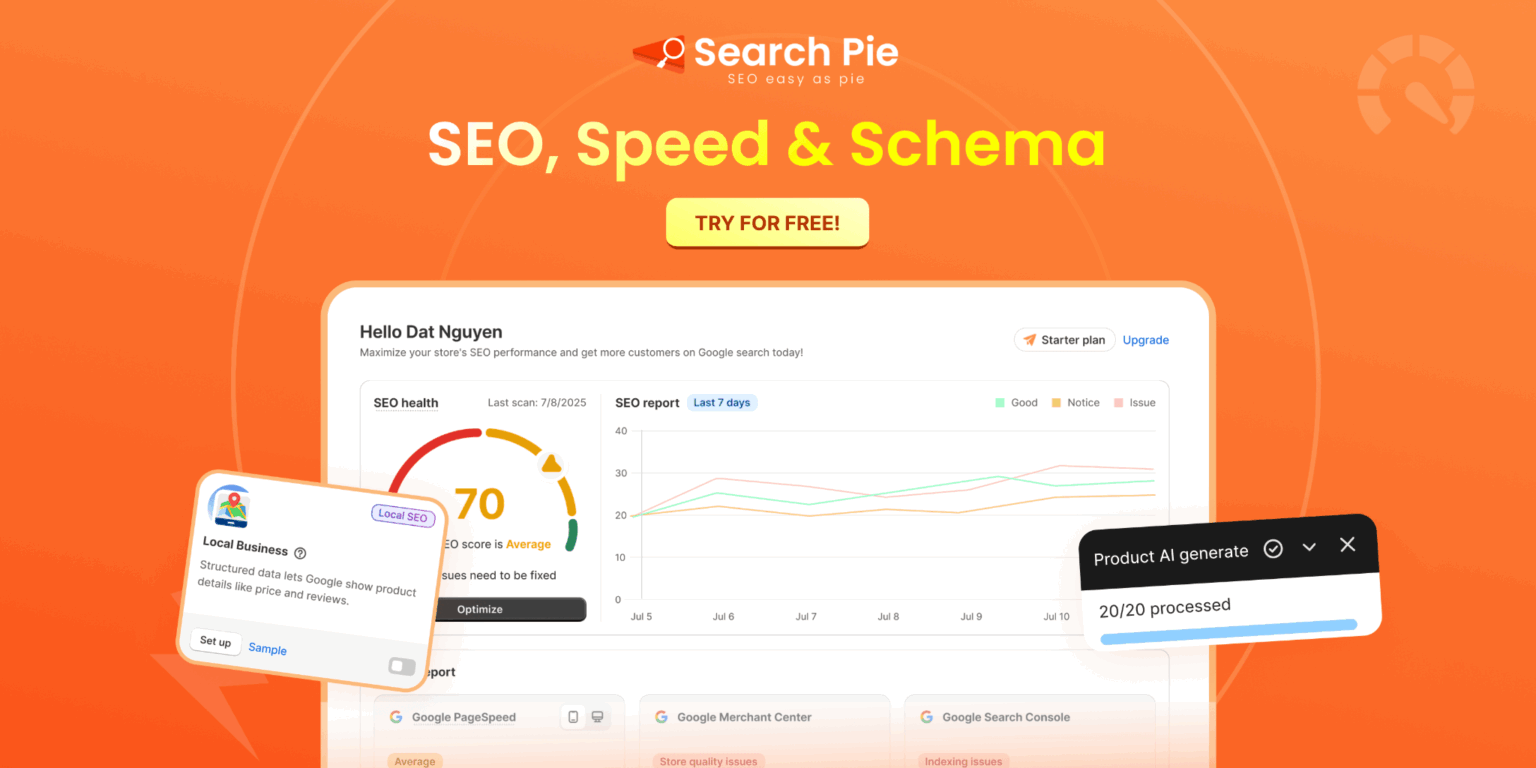
SearchPie: SEO, Speed & Schema is an all-in-one SEO and speed optimization app built specifically for Shopify merchants that handles the technical SEO work most beginners do not know where to start with. The app streamlines website optimization by allowing bulk edits for meta tags, providing keyword research and audit tools to target high-impact search terms, and boosting page speed through image compression and code reduction. Furthermore, it maximizes store visibility and click-through rates by automatically generating product schema for Google rich snippets, guiding content creation with a step-by-step Blog SEO checklist, and future-proofing your store by structuring data so it can be easily read and recommended by modern AI search engines like ChatGPT and Google AI Overviews.
Email Marketing
Email marketing gives your Shopify business a direct channel to reach interested shoppers without paying for each contact. Build your list from day one using a simple welcome popup offering a small discount in exchange for an email address. Once you have subscribers, send regular emails covering new products, promotions, and useful content related to your niche.
Automated flows like abandoned cart emails recover shoppers who added products but left without buying. These automated sequences require setup once and then run continuously, making them one of the highest-ROI activities for any Shopify business.
Social Media Marketing
Choose one or two social media platforms where your target audience spends time and focus your efforts there rather than spreading thinly across all platforms. A Shopify business selling visual products like fashion, home decor, or food does well on Instagram and TikTok. A store selling technical products or professional services may find LinkedIn or YouTube more effective.
Consistency matters more than volume. Two to three high-quality posts per week outperform daily low-effort content for most Shopify businesses.
Influencer Marketing
Partnering with content creators whose audience matches your target customer is particularly effective for new Shopify businesses that do not yet have their own audience. Micro-influencers with 10,000 to 100,000 followers often deliver better results than larger influencers because their audience is more engaged and their rates are significantly lower.
Paid Advertising
Paid ads on Google or Meta can generate sales faster than organic channels, but they require budget and testing to become profitable. For most Shopify beginners, starting with organic channels and adding paid ads once you have a positive conversion rate on your store is the safer approach. Running paid traffic to a store with a poor conversion rate amplifies the loss rather than the profit.
Start Your Shopify Business With the Right Foundation
Setting up a Shopify business is genuinely manageable for complete beginners. The platform handles hosting, payment processing, and inventory management so you can focus on building a brand and getting customers. The technical barriers that used to require a developer or a significant budget are largely removed.
What Shopify does not do for you is the marketing. Getting consistent traffic and sales requires choosing the right channels for your audience, testing what works, and refining your approach based on real data from Shopify Analytics, Google Analytics, and Google Search Console.
Start with the basics: configure your settings, add your products with strong descriptions and quality images, set up payments, and launch. Then focus entirely on getting your first ten sales before building out your marketing strategy further.
FAQS
Whether you need a business license depends on your country, state, and local regulations. Check with your local government to determine the requirements before launching your Shopify business.
Choose a niche, create a Shopify store, add your products, set up payments and shipping, then promote your store through SEO, social media, and email marketing.
Yes. Shopify is designed for businesses of all sizes and provides affordable plans, easy store management, and tools to help small businesses grow online.
You can start a Shopify business with a relatively small budget. Your main costs typically include a Shopify subscription, a domain name, product inventory, and marketing expenses.
Yes. You can use business models like dropshipping, print-on-demand, or selling digital products, allowing you to operate a Shopify store without holding inventory.